Shipping agencies ↗
Connect port calls, vessel information, PDA and FDA accounts, Statements of Facts and cargo documents around your agents' daily work.
CUSTOM SOFTWARE FOR MARITIME TEAMS
Bring port calls, documents, accounts and team handovers into one workspace. We tailor the software to your business, starting with the process you want to improve.
Designed by a practising ship agent. Shaped by daily port-agency work.
PDA ↗ Port call ↗ Documents ↗ FDA
TAKE A LOOK AROUND
Actual product views.
Fictional data, real workflows.
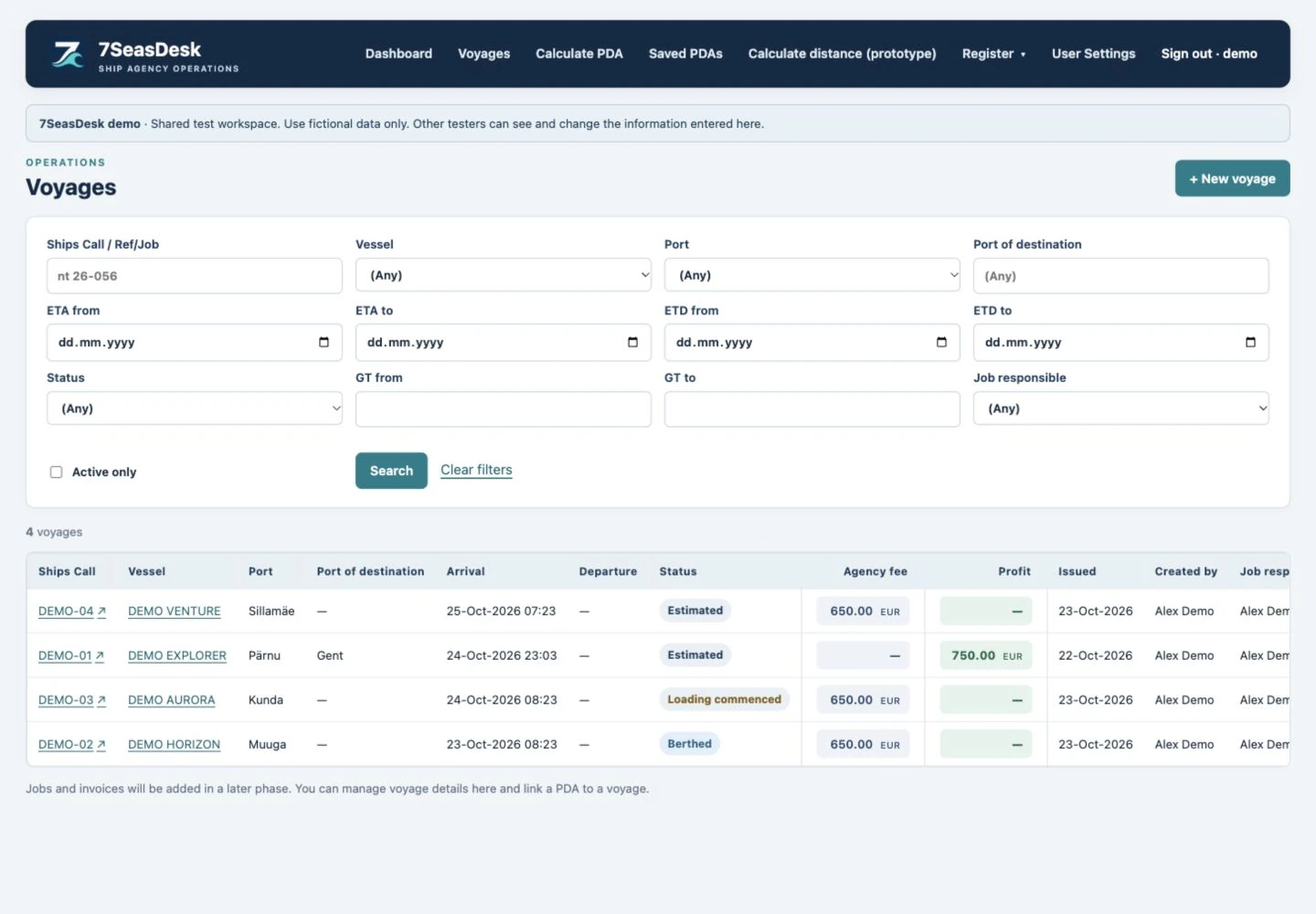
Keep vessel, port, ETA, status, agency fee and profit visible in a single voyage register.
EXAMPLE CONFIGURATION · FICTIONAL DATAEXPERIENCE BEHIND THE SOFTWARE
7SeasDesk was created by Krister Orgusaar, a practising ship agent who works with port calls, vessel details, cargo documents and disbursement accounts every day.
That experience shapes the questions we start with: where information is entered twice, which document needs the latest quantity, what the next agent needs at handover, and how an estimate becomes a final account.
Your business brings its own requirements. We work through those details with you and agree what the tailored solution needs to do.
DIFFERENT TEAMS. DIFFERENT REQUIREMENTS.
Explore an example that fits your work. Your final setup is shaped around the processes, documents and responsibilities you bring to the project.
Connect port calls, vessel information, PDA and FDA accounts, Statements of Facts and cargo documents around your agents' daily work.
Coordinate vessel particulars, port-call information, document handovers and port costs. Define the views and reporting your office needs.
Bring your own process: document flows, operational records, approvals or data exchanges. We review the scope and dependencies with your team.
FULLY TAILORED TO YOUR BUSINESS
We build and configure the solution around your requirements. Use the connected port agency platform as a starting point, or discuss a different maritime workflow. Documents, calculations, automation, permissions, reports and integrations are defined around your requirements.
Your forms, layouts, logos, signatures and shared information. We work from the documents your team actually uses and check the resulting PDFs with you.
Your call stages, handovers, responsibilities and approvals. Define how agents, managers and accounting work together and what each role can access.
Your ports, terminals, customer agreements and calculation rules. Configure the relevant charges and conditions while keeping saved account figures understandable.
The cargo, operational and financial information your team needs to see. Shape filters, summaries and exports around the questions your business asks.
Tell us which other systems need to connect. Required interfaces, data transfers and third-party dependencies are reviewed and included in the agreed project scope.
Discuss hosted deployment or installation on your own server. Hosting, access, support and future development are agreed around your organisation’s requirements.
A PRACTICAL WAY TO BUILD
Start with one workflow, the forms you use and the work that takes too long.
Define the screens, rules, documents, integrations and acceptance checks.
Work through realistic examples with your team and review the generated output.
Agree hosting, access, data handover, support and the next priorities.
A FEW PRACTICAL DETAILS
The quote depends on your workflows, document layouts, calculation rules, integrations, hosting and support needs. We review the requirements with you and agree the scope and commercial terms before implementation.
Documents and branding, operational workflows, port and terminal tariff rules, roles and approvals, management reports, interfaces and deployment. We agree the scope and priorities with your team before implementation.
We review your workflow and example documents, define the scope, build and test the configuration with your team, then agree the rollout and ongoing support. The screenshots on this site show one fictional example configuration.
Shipping agencies, onshore ship managers and maritime operations teams that need software built around their own processes. Bring your workflow, documents, reporting or integration requirements; we define the scope and build the solution with you.
Yes. We can start with an example configuration and walk through a sample call. Your own workflow, document formats, tariff rules and reporting requirements then shape the tailored solution.
Prepare Statements of Facts (SOF), Bills of Lading, cargo manifests, terminal notifications, port clearances, loading and discharging requests, and the master’s questionnaire. Discuss your solution to review the document formats your team needs.
Profit is an internal view based on sales minus costs. It is kept off the customer PDA and FDA PDFs.
Yes. Send us your name, company and what you would like to explore. We will arrange the next step with you. The screenshots on this page use fictional demonstration data.
WORKFLOWS FOR SHIPPING AGENTS
7SeasDesk provides tailor-made ship agency software for the people coordinating vessels, terminals, cargo documents and disbursement accounts. Use these example workflows to identify what your own solution needs to support.
Several products, separate B/Ls, VAC or AIR quantities and terminal-specific documents. See how the shared call workspace connects those details.
Tanker port agency software ↗PRACTICAL WORKFLOW GUIDEVessel particulars, the PDA, cargo operations, SOF, sailing documents and final charges. A practical checklist to review your agency’s workflow.
Explore the port call workflow ↗FREE REQUIREMENTS TOOLChoose software with a practical checklist.Set priorities for 24 workflow requirements and export a checklist to use with your team or a vendor.
Build your requirements checklist ↗LET’S SHAPE YOUR SOLUTION.
Bring the process you want to improve: repeated data entry, document preparation, approvals, calculations, reporting or a connection between systems. We will review the workflow and agree what to build.
info@7seasdesk.com ↗Contact Krister on LinkedIn ↗
Prefer a direct message? Tell me which workflow your team wants to improve.
A first conversation about your workflow, documents and requirements.