
Tailored to your agency. These workflows are examples of what we can build around your documents, processes, tariff rules and reporting requirements. Explore tailor-made solutions ↗
PORT DISBURSEMENT ACCOUNT SOFTWARE
PDA & FDA software.
From estimate to final account.
Prepare a Proforma Disbursement Account, carry the estimate into the port call and reconcile the actual charges in the Final Disbursement Account. Keep operational details and agency finances connected.
Discuss your solution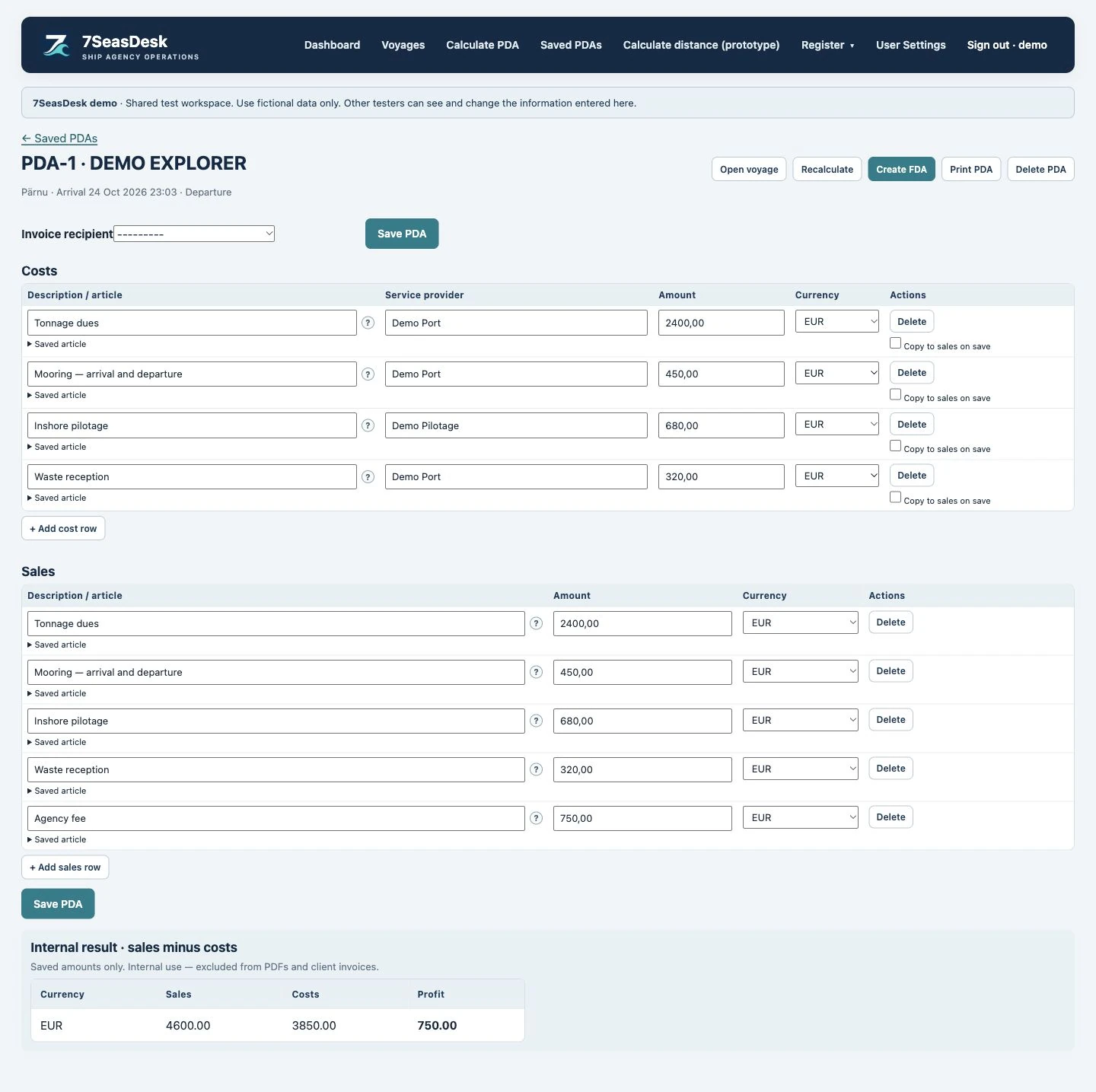
What is the difference between a PDA and an FDA?
A Proforma Disbursement Account (PDA) is the estimate prepared for a port call. A Final Disbursement Account (FDA) records the charges at the end of the call. The estimate and the final account serve different stages of the work, so a change in the final charge should remain understandable when the two are reviewed.
7SeasDesk brings those stages into one workflow. Prepare the estimate using the vessel and port information, activate the associated call, then review the final costs and sales against the saved estimate.
Keep costs, sales and agency fees clear
Cost and sales lines are kept separate. This lets your team review supplier costs, the amounts charged to the client and the agency fee without mixing them together. Internal profit remains an internal view and is kept off the customer PDA and FDA PDFs.
Saved company details help you reuse recipients and previously agreed agency fees. When a call needs a separate FDA for another recipient, an additional FDA can be created under the same PDA; it starts empty to avoid copying the same charges into a second account.
Make the calculation behind a charge visible
A total is easier to check when its basis is visible. For configured Ventspils charges, the customer PDF can show the saved calculation beneath the charge description, including the relevant GT or RGT basis and recorded adjustments.
Port rules differ. Navigation dues and other services may use different tonnage bases, discounts or operational conditions. Tariff values remain editable; your agency should review the applicable port, terminal and date before issuing an estimate. Printing an existing account uses its saved amounts rather than recalculating it from a later tariff.
Reconcile invoices alongside the final account
Attach supporting invoices to individual FDA charge rows, with more than one file where needed. When a cost is explicitly copied to a sales row, its supporting files can follow the corresponding charge. The FDA print option can include the supported PDF or image evidence for that account, or produce the cover on its own.
Confirmed FDA records are locked against routine editing, and their payment details are retained as a snapshot. That gives the team a defined point at which the final account is approved.
A practical workflow to review in your demo
- Select a vessel, port and client.
- Prepare the PDA and check its rates, conditions and agency fee.
- Activate the port call and maintain its operational information.
- Review the FDA, add the actual charge evidence and check the recipient and bank details.
- Approve the final account and generate the customer documents.
We can walk through a fictional call and the document formats your agency needs. Port tariff coverage, bank details and document setup are reviewed during onboarding.
A worked PDA-to-FDA comparison
This fictional example compares customer charges in EUR. It illustrates the review workflow; these figures are not a port tariff or a quotation.
| Charge | PDA estimate | FDA actual | Difference |
|---|---|---|---|
| Port dues | 1,000.00 | 1,100.00 | +100.00 |
| Towage | 600.00 | 650.00 | +50.00 |
| Agency fee | 500.00 | 500.00 | 0.00 |
| Total EUR | 2,100.00 | 2,250.00 | +150.00 |
When reviewing the extra EUR 150.00, the team needs to identify which charges changed, check the supporting evidence and confirm the intended recipient. Supplier costs remain a separate internal record; adding them again to these customer charges would double-count the account.
Use the recorded operational events and supplier documents to explain the call, then check the saved calculation basis, customer document and approval state. The estimate should remain available for comparison instead of silently becoming the final account.
Questions to test when choosing disbursement account software
- Can the agent explain the vessel tonnage, tariff basis, quantity and rate behind each applicable charge?
- Can the office keep supplier cost, customer charge and agency fee separate?
- Can a charge have more than one supporting invoice or service voucher?
- Can an additional recipient have a separate final account and document reference?
- Can the team review and approve the final figures before generating customer documents?
These checks connect the accounting screen with the agency's full port-call workflow. Agree supported tariffs, currencies, recipients and document layouts as part of your configuration.
SEE IT WITH A REALISTIC PORT CALL
Let your workflow shape the solution.
Tell us about your agency, forms, ports and handovers. We will review an example configuration and define what your tailored solution needs to support.
Discuss your solution