
Tailored to your agency. These workflows are examples of what we can build around your documents, processes, tariff rules and reporting requirements. Explore tailor-made solutions ↗
STATEMENT OF FACTS SOFTWARE
Statement of Facts software.
One clear port-call record.
Build the Statement of Facts (SOF) around the events of the vessel’s visit. Keep dates, times, cargo details and operational notes together, then generate the document as a PDF.
Discuss your solution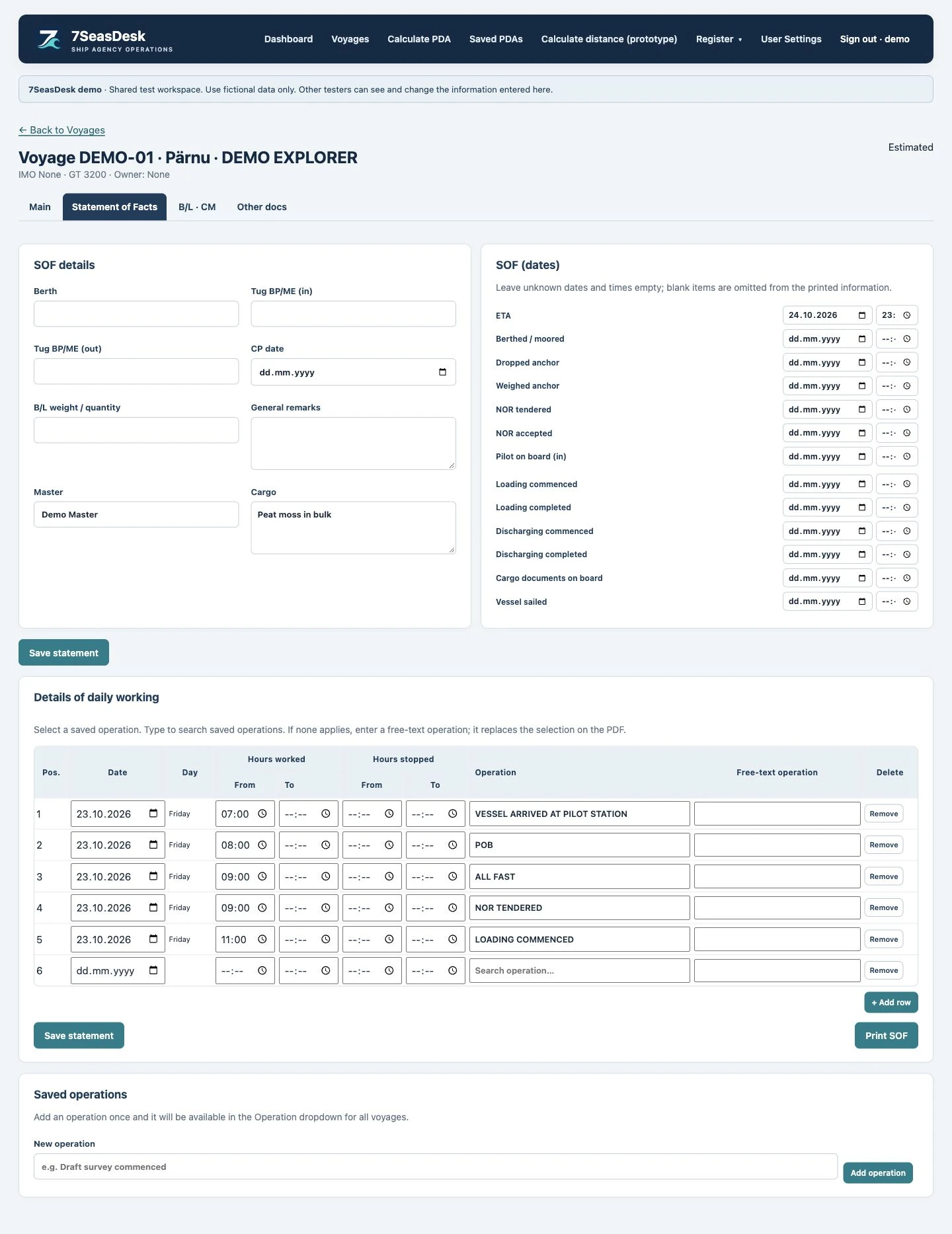
What does a Statement of Facts record?
A Statement of Facts records the sequence of events during a port call. Depending on the operation, that can include arrival, notice of readiness, berthing, cargo work and departure, together with the interruptions and operational notes that need to be recorded.
The SOF is a factual record. Its entries should reflect the events reported by the vessel and the parties involved. The software helps organise that information; it does not decide contractual laytime or demurrage entitlement.
Enter the operation that actually happened
Add your own operation descriptions, select a saved term from the operation list, or save a new term for later use. Start from the configured loading or discharging wording, then review, add or remove rows to reflect the actual events of the current call.
You can also load information from an earlier visit as a starting point. Check all copied dates, times, vessel details and cargo information before using it for the new call. Reusing an earlier document should save typing without turning an old event into a new fact.
Keep single times and time ranges readable
An event may need one time or a start and finish time. The PDF aligns each time with the corresponding side of the time column. Where both times are entered, a hyphen separates the range.
The date is printed on the first entry and when it changes, instead of repeating it on every line. Entries can be ordered by time, and the editor also provides controls to move rows when the operational sequence needs manual adjustment.
Use the same information across the call
The SOF works with the vessel, master, berth, cargo and relevant dates already stored for the call. Shared fields connect the main voyage information, the statement and the document workspace, reducing repeated entry of the same details.
When another window has changed saved information, the application warns you before generating from stale information. Review the latest saved details so that the output reflects the intended version of the call.
Generate a clear PDF and control the remarks
The print layout aims to keep the SOF compact. Longer statements continue onto numbered pages, with remarks placed on the final page. Terminal layouts and loading or discharging wording are selected for the call.
Optional terminal remarks are selected by default on a new, previously unsaved statement and can be switched off individually. Existing saved selections are retained. The printed statement has a white background, ready for the relevant parties to review and sign.
Discuss your solution to review a sample loading or discharging call and the SOF layout your agency needs.
Example: parcel completion and the overall cargo operation
The following fictional sequence shows why a parcel event and the overall discharge completion are different facts. It is a software demonstration, not a customer record.
| Time | Event | What it describes |
|---|---|---|
| 09:10 | Commenced discharging parcel A | Start of one product's work |
| 12:20 | Completed discharging parcel A | Parcel A is finished; the vessel is still discharging |
| 13:00 | Commenced discharging parcel B | A separate parcel event |
| 16:15 | Completed discharging parcel B | Parcel B's recorded completion |
| 17:00 | Overall discharge completed | The completion entered for the SOF header after review |
In the configured workflow, an agent can set the header commencement and completion manually without changing the individual operations. A blank commencement can use the corresponding recorded start event. A parcel completion must not automatically close the entire operation.
For a vessel that discharges and then reloads, keep separate loading and discharging statements within the same port call. Review the readiness, berthing and cargo events for each operation.
What to check in an SOF PDF
- Current cargo and quantity: review the intended summary or individual products, including explicitly entered units and separate VAC or AIR weight bases.
- Dates and times: distinguish a recorded date without a known time from an explicitly entered midnight.
- Continuation pages: a long statement needs a clear Page 1/2, Page 2/2 counter and signing space on each page.
- Consistent presentation: check the first operation, long notes and manually reordered events in the same print preview.
Bring a short statement and a difficult multi-page example to the SOF workflow demonstration. The agreed template and acceptance checks should reflect your agency's actual forms.
SEE IT WITH A REALISTIC PORT CALL
Let your workflow shape the solution.
Tell us about your agency, forms, ports and handovers. We will review an example configuration and define what your tailored solution needs to support.
Discuss your solution